
FABLE-SHOWCASE
FABLE-SHOWCASE: 57 working demos from a single prompt
One instruction, a few hundred AI agents working in parallel, and a gallery of 57 finished interactive pieces by the end of the day.
What this means for you
Most people meet AI one conversation at a time. You ask a question, you get an answer, you ask another. It is natural to assume that is the shape of the thing: a single helper, working on one request, waiting for you between turns.
That picture is already out of date. The same AI can be run as many copies at once, each given its own job, each checking the others’ work, with no person in the middle passing messages. This project is a plain demonstration of what that looks like when you let it run.
The setup was close to a dare. The author had a week’s allowance of AI usage and decided to spend all of it in a single day. He typed one casual paragraph asking the AI to build as many impressive creative demos as it could, in parallel, until the allowance ran out. Then he let it go.
What came back was 57 finished pieces. Each one is a small interactive world that runs in a web browser. There is a flock of birds that wheels and turns the way real starlings do. There is a black hole that bends the light of the stars behind it. There is a pinball table, a coral reef, a stained-glass window generator, a cathedral that goes on forever, a synthesizer you play with light, and a garden that grows from a few rules. None of them is a sketch. Each was designed, built, improved and tested before it was counted as done.

How it was done
The single instruction was handed to an AI model called Claude Fable 5, running inside a tool that lets it start other copies of itself. Those copies were organized like a production line. One planned a demo. Another built it. Another went back over it to make it better. Another checked that it actually worked. Roughly 275 of these runs happened over the day, many at the same moment.
Two things about the result are worth noticing. The first is that every demo is a single file with nothing else attached. It needs no internet connection and no extra software, which means it will still open in ten years. The second is that the person involved made one decision, at the start. Everything after that was the system organizing itself.

That is the real subject here. The demos are charming, and they are also evidence. They show how much finished work one sentence can now set in motion, and how little supervision it took. Whether that makes you excited or uneasy, it is better to see it than to hear about it.
How to use it
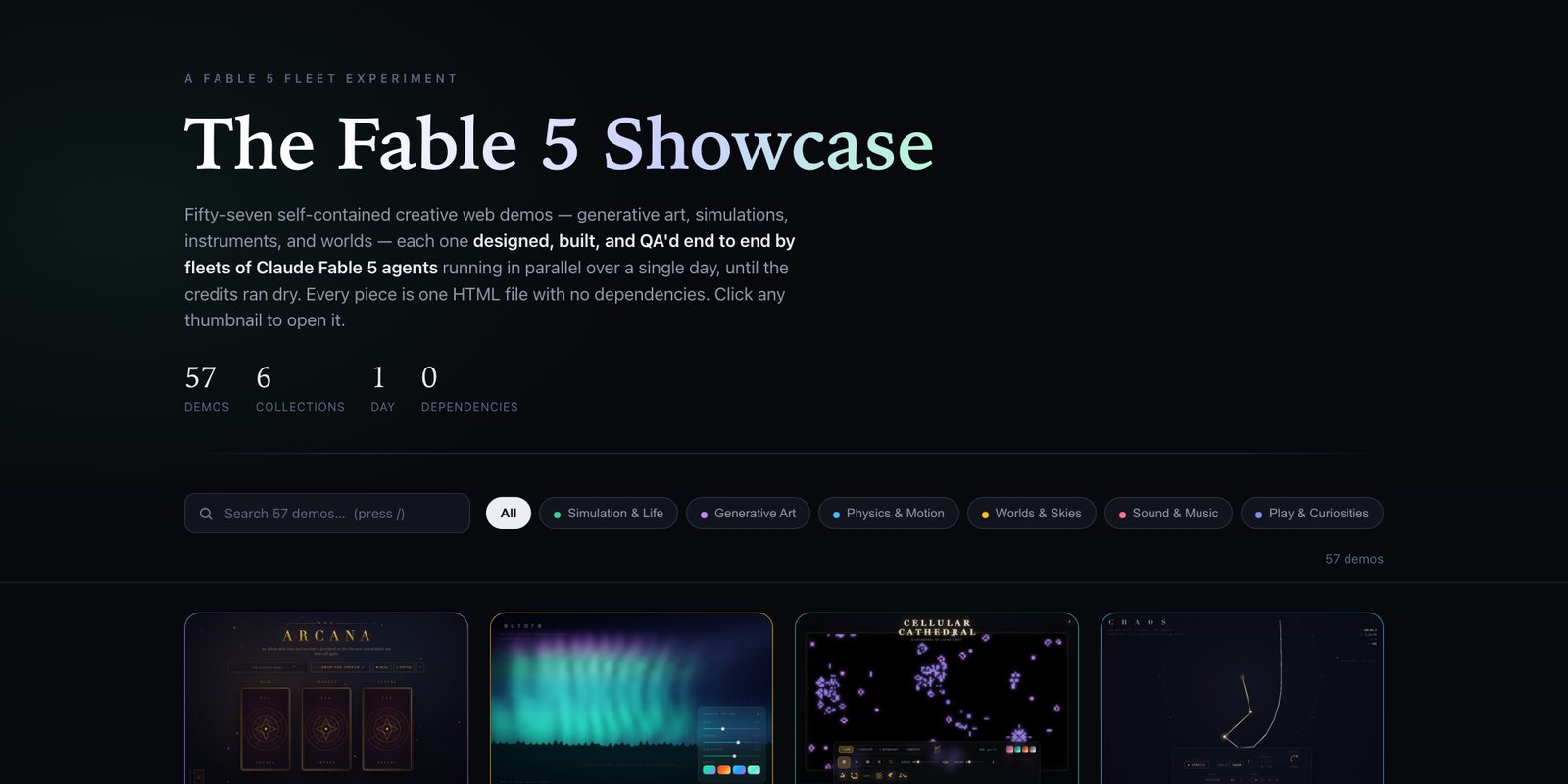
The quickest way to see it is the hosted gallery at elder-plinius.github.io/FABLE-SHOWCASE, which opens in any web browser. The whole collection is also free on GitHub at the link above, with no account needed, if you want your own copy. On that page there is a green “Code” button with an option to download everything as a ZIP file. Unzip it, open the folder, and double-click the file called index.html. A gallery opens in your browser with a thumbnail for each of the 57 demos. You can search it or filter by type: simulations, generative art, physics, worlds, sound, and games.
Click any thumbnail to open that demo. Most respond to your mouse or keyboard, so try moving, clicking and dragging. Nothing is sent anywhere and nothing is installed. When you are finished, close the tab.
The original instruction is printed on the project page, word for word. It is worth reading, mostly for how ordinary it is.
What it is
The Fable 5 Showcase is a repository of 57 self-contained creative web demos, produced in one day from one prompt by fleets of Claude Fable 5 agents running in parallel under Claude Code. The repo frames it as an experiment in the limits of one-shot prompting: what a single instruction yields when the model is free to fan work out to subagents until a fixed usage budget is exhausted.
The output
Each demo is a single index.html with zero dependencies: no build step, no CDN, no framework, no network requests. They fall into six collections.
- Simulation and life. Boids flocking, particle life, slime-mold growth, ecosystem models, an L-system garden.
- Generative art. A fractal explorer, stained glass, calligraphy, mandala and geometric pattern generators.
- Physics and motion. An n-body orbital sandbox, gravitational lensing around a black hole, Chladni plate patterns, gear trains, a ripple tank.
- Worlds and skies. Aurora, an unbounded procedural cathedral, an ocean, a city, a small planet, hex maps.
- Sound and music. A light-driven synthesizer, a playable circle of fifths, generative radio.
- Play and curiosities. Pinball, falling sand, a maze viewer, a terminal game, clocks, a rock garden.
How it was made
A single natural-language prompt was given to Claude Code. The orchestrating session fanned the work out across background multi-agent workflows, about 275 subagent runs in total. Each demo moved through a four-stage pipeline:
| 1 · Design | concept and specification |
| 2 · Build | single-file implementation |
| 3 · Enhance | polish pass on the built demo |
| 4 · QA | verification before acceptance |
Fifty-seven demos through four stages accounts for 228 runs. The remainder is consistent with retries, orchestration and the gallery itself, though the repo does not break the figure down. Thumbnails were captured by rendering each demo in a headless browser, and the gallery embeds them as data URIs so that it has no external requests either.
Why the constraints matter
The single-file, zero-dependency rule does two jobs. It makes every artifact independently verifiable: a reader can open one file and see whether it works, with nothing else to install or trust. It also keeps parallel agents from colliding. With no shared modules, build configuration or package manifest, each agent owns one directory and there is nothing to merge. That is the property that lets the fan-out scale without a coordination layer beyond the pipeline.

What the repo documents is a ratio. Human input was one paragraph and a budget. Machine output was 57 designed, implemented and checked artifacts. The interesting variable is the pipeline in between, and it is ordinary: split the work, separate the roles, and put a check at the end.
What it does and does not show
It shows that a current frontier model can decompose an open creative brief, run a staged pipeline over many parallel workers, and deliver working software without further human direction. It does not report a failure rate, how many attempts were discarded, the token cost, or how the QA stage defined a pass, so it is a demonstration and should not be read as a benchmark. The prompt is published in full in the README, which makes the run repeatable in outline by anyone with comparable access.
How to use it
- A hosted copy of the gallery runs at elder-plinius.github.io/FABLE-SHOWCASE.
- Clone or download the repo and open the root index.html for a searchable, category-filtered gallery.
- Each demo lives at <demo-name>/index.html and opens directly from disk.
- Captured previews are in thumbs/.
The repository lists no license at the time of capture.